



Retrofit: How do you add batteries to an existing inverter?
Introduction
A common question asked by solar PV system owners is how their system can be connected to a battery. When you already have an existing system, there are a few things to consider, which we’ll cover in this post on the Technology Blog. There are many different ways to connect a battery, depending on how the existing system is configured and what requirements are placed on the new system. One useful thing to keep in mind is that:
It doesn’t matter which system you have; it can always be supplemented with a battery. The only question is how!
Before we take a deep dive into how to add a battery, it’s worth understanding why you might want one.
- Become your own energy bank: Store solar energy during the day and use it in the evening. Now that the 60-öre tax credit is going away, maximising self-consumption is extremely important.
- Protect yourself against power cuts: Choose a system with backup power and you can keep essential functions running even when the electricity grid is down.
- Contribute to a smarter electricity grid: With the right controls, your battery can help balance Sweden’s entire electricity grid — and you can get paid for it! You can support grid frequency through ancillary services and support the local grid through local flexibility services.
- Add smart controls and let the battery save and earn money for you — with smart EMS (energy management system) solutions, the battery’s charging and discharging are managed completely automatically. Many of these offer advanced AI services, and the inverter already has plenty of smart features to control the battery in the most profitable way.
Different types of inverter
As explained in Senergia's solar technology handbook (available to download for free here: LINK), there are several different inverter types, or inverter topologies. What distinguishes the inverters is not how they convert direct current into alternating current, but how the system is configured to do so.
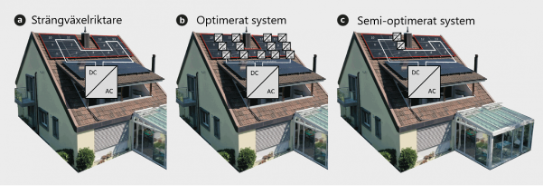
A. String inverter
Here, all the solar panels are connected in series, forming a string. A string inverter can have several strings connected to it, and the panels in each string always face the same direction and have the same roof angle.
B. Optimised system
A (fully) optimised system means that each panel has an optimiser (DC/DC converter) connected to it. These systems are usually made by SolarEdge or Huawei.
C. Semi-optimised system
A semi-optimised system is a string inverter system with optimisers on some panels. These optimisers are usually made by Tigo.
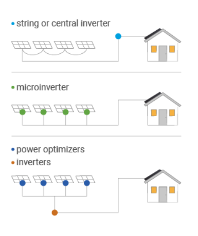
Different categories of inverters
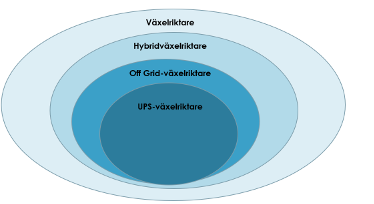
When it comes to inverters that are battery-ready, these are known as hybrid inverters. They are called hybrid inverters because they can handle both the direct current from the solar panels and the battery in the same inverter. Of the different types of hybrid inverters, several support off-grid operation, and some can also provide UPS operation (uninterruptible power supply). This means they can switch from mains power to off-grid operation in just a few milliseconds. The switch is so fast that lights do not even flicker and electronic equipment does not even turn off.
Different ways to connect a battery (DC- or AC-coupled)
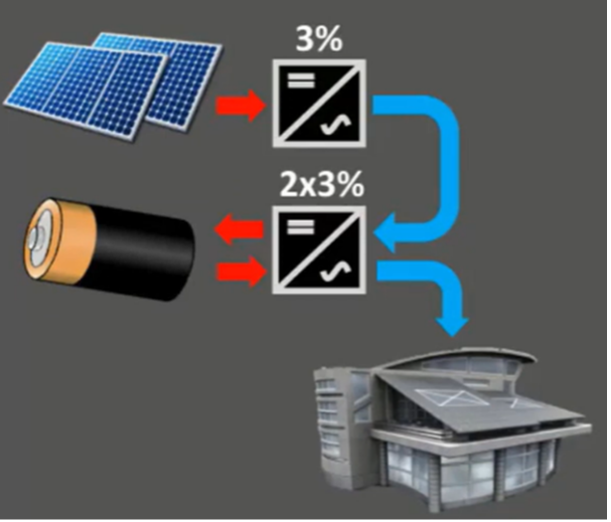
In an AC-coupled system, separate inverters are used for the solar panels and the battery. This is common when you initially bought an inverter that does not support batteries and later want to add one. In that case, you add a separate battery inverter.
Disadvantages
Multiple conversions: The energy is converted three times (DC to AC, AC to DC, and DC to AC again), resulting in losses of around 9%, compared with 4% in a DC-coupled system.
Multiple apps and messy data: When you have different inverters (from different manufacturers), all the data is not collected in the same app. And when you also want to connect a smart EMS system, controlling two inverters is often more complicated than using one.
Advantages
Flexibility: The option to combine different systems and install batteries even without solar panels.
Recommendation: Use the same inverter brand for both units for easier management and clearer data visualisation.
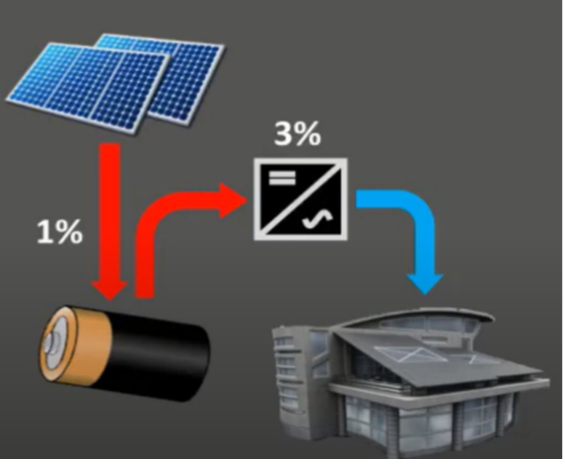
A hybrid inverter handles both the DC power from the solar panels and the battery using a single unit. It has a built-in charge controller for charging and discharging the battery, as well as an inverter function.
Advantages of a DC-coupled system
- Efficiency: DC power from the solar panels is not converted before being stored in the battery, resulting in losses of only 1%.
- Conversion cost: Converting DC to AC costs 3%, the same as without a battery.
- All the data in one place: When the battery and solar panels are connected to the same inverter, all the data is available in a single app. It is also easier to control a single inverter using different EMS systems (e.g. Markedroid, Eneqiu and others).
What should you consider?
There are a few things to consider to ensure that a system works as intended with the desired functionality when adding a battery. Sometimes it is super simple, while at other times it becomes more complex.
When planning to expand a solar PV system to include a battery, there are a few things to consider that will affect the choice of system and functionality. Some of the questions to consider are:
- How will data be stored and visualised?
- How will the system be controlled, and which system will control it?
Should the inverter be connected to an external EMS system for external control (for example, to provide ancillary services)? - Should the new hybrid inverter replace the existing inverter, or should it be connected in parallel or directly, i.e. DC- or AC-coupled?
What questions should I ask?
- How is your existing solar PV system configured?
- Which solar panels are currently installed?
- How many are there, and how are they connected — in other words, how are the strings wired?
- What is the output of the panels?
- Which inverter do you have today? What is its capacity in kW?
Include the model/serial number of your existing inverter and take a photo of the label on its side. - What will your battery system be used for, and what functional requirements do you have?
For example, off-grid operation, peak shaving, EMS, ancillary services, etc. - Where will the battery be located (indoors or outdoors), and where is your electrical distribution board located?
Case 1 – Hybrid inverter (without a battery)
The simplest case. You just need to connect the battery/batteries. Check which batteries are compatible with the inverter and how large the battery stacks can be. Use Senergia’s Battery Guide, which you can download free of charge from www.senergia.se/dokument.
Case 2 – String inverter (or a semi-optimised system)
Solution 1 – Replace the existing inverter
If a string inverter is already installed (e.g. SMA, Kostal or Fronius), the simplest option is to replace it with a hybrid inverter. This means all the solar electricity goes directly into the hybrid inverter and the battery is connected to the same unit. All the data and controls are in one place, avoiding unnecessary losses. It is also a very straightforward installation if the battery can be installed next to the inverter.
Solution 2 – Install an AC-coupled hybrid inverter
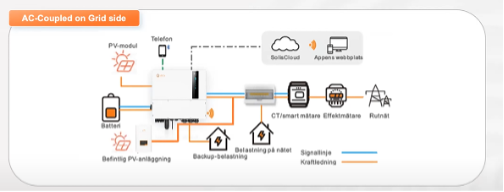
If the battery has to be installed in a different location from the existing string inverter, a separate smart meter is needed for the existing string inverter. This is connected to the hybrid inverter (i.e. two smart meters are used).
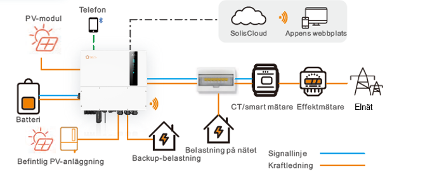
Special case – Solis (using the generator port)
Solis hybrids of 12 kW and above have a generator port. This can be used to connect an existing PV system. The existing inverter is connected to the generator port, allowing the Solis inverter to read the AC power in that port and display the data in the Solis app. This requires no external meters or anything else. Remember that the Solis inverter must be rated for at least as many kW as the existing string inverter, and that Solis cannot externally control a third-party inverter.
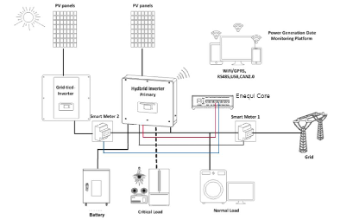
Special case – Enequi
To use Enequi with smart control, connect an additional smart meter to Enequi Core. Enequi Core then receives data via the hybrid inverter from the smart meter in the main distribution board. This gives Enequi full control over all energy and power flows in the property and allows it to bring all the data together in one place. It is important to remember that when you check the app for your hybrid inverter, it does not have access to all the data, so it will display different figures from the Enequi app (which shows the correct data).
Special case – Markedroid
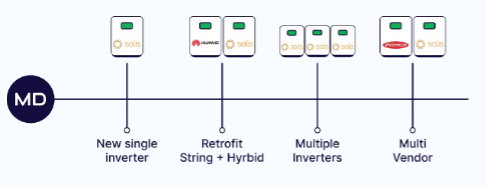
Markedroid supports multiple inverters in the same system. It can communicate with several inverters from different manufacturers. This means that all data, regardless of manufacturer, is visualised and displayed in the Markedroid app. The only requirement is that all the inverters are on the same home network. This can be very convenient if, for example, one inverter is in the garage and another in the basement. Remember that Markedroid only controls one hybrid inverter per site. In other words, you cannot have several different hybrids from different manufacturers. Contact Senergia for help with sizing and configuration if you are unsure.
Case 3 – SolarEdge (not hybrid)
Because SolarEdge systems have optimisers fitted to every panel and require a SolarEdge inverter, you must choose an AC-coupled system if you want to add a battery system. The easiest option is to choose a hybrid inverter and install a separate smart meter on the SolarEdge inverter (see section above). Of course, you can also use the special option with the Solis generator port to get all the data in one place.
Special case – unlock optimisers with SolarEdge KEY.
There is a historical product called SolarEdge KEY-1000. It is used to deactivate the functionality in a SolarEdge string and makes all the optimisers enter “bypass” mode, i.e. they are completely deactivated. This allows you to deactivate the optimisers and replace the SolarEdge inverter with a “standard” inverter. Here is a video (in Dutch) showing how the process works: LINK.
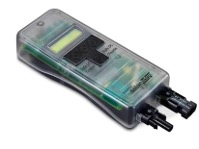
Remember that the strings in a SolarEdge system do not follow the same design rules as strings in a string inverter system. This can result in the voltage being too high, meaning that strings with deactivated optimisers cannot be connected to a new inverter. Contact Senergia if you need help with system sizing.
Summary
If you own a system with an inverter that is not battery-ready, the best and usually simplest option is to replace it with a new hybrid inverter. If you have SolarEdge, we recommend installing a parallel system with a dedicated inverter for your battery. Take particular care when placing your order with your installer, and specify whether and how the system should work with an external EMS (e.g. Enequi or Markedroid), and whether backup functionality is required. Feel free to contact Senergia’s technical support, and our engineers will help you make your solar energy project a success.
Need help finding the right solution?
We know it’s not always easy to know which product or solution is best for you. Whether you have questions about our range, need guidance or would like help finding a solution that suits your needs, we’re here for you. With our knowledge and experience, we’ll help you make the right choice.
Related posts
This is how a fire safety engineering design is carried out

The Salmon Project